> ## Documentation Index
> Fetch the complete documentation index at: https://docs.devin.ai/llms.txt
> Use this file to discover all available pages before exploring further.
# Devin で GitLab 上の SonarQube の課題を解決する
> GitLab CI と Devin API を利用して SonarQube の脆弱性を Devin に引き渡し、v1 のセッションステータスをポーリングして、レビュー用の修正マージリクエストを作成します。
Devin の API は強力なツールです。このガイドを読み進める前に、まず次の[記事](/ja/enterprise/use-cases/sonarqube/guide)をお読みください。
### 1. プロセス概要
1. **Pull Request が作成される**: コードスキャンツールによって問題が検出された可能性のある変更を含む Pull Request (PR) がリポジトリに送信されます。
2. **GitLab Action がトリガーされる**: PR のオープンによって、自動的に GitLab Action ワークフローがトリガーされます。
3. **GitLab Action が Devin API を呼び出す**: GitLab Action が Devin API にリクエストを送り、検出された問題を自動解決のために渡します。
4. **Devin セッションが初期化される**: Devin セッションが起動し、問題のコンテキストを受け取り、提供されたデータに基づいて解決を試みます。
5. **Devin が人間によるレビュー用の PR を提案する**: 問題が解決されると、Devin は提案された変更を含む PR を作成し、人間によるレビューのために送信します。
### 2. この手順を完了するためのステップ
1. **必要なシークレットを保持するために GitLab 環境を構成する**:
* Devin の API やその他の連携ツールとやり取りするために必要な認証トークンや設定キーなどのシークレットを安全に保存できるよう、GitLab 環境を設定します。
これらの手順が完了すると、パイプラインは Devin の API を使用して問題を自動的に解決できるようになり、処理の高速化と手動対応の削減につながります。
2. **連携をテストする**
セットアップが完了したら、GitLab Action を手動でトリガーして連携をテストできます。これにより、Action が正しく Devin API を呼び出し、検出された問題を解決できているかを検証できます。
3. **Devin Sessions ページを参照する**
GitLab Build がトリガーされ、Devin が問題を処理した後は、Devin の Sessions ページでステータスと結果を確認できます。このページでは、解決された問題の詳細や、提案された変更内容を確認できます。
前述のとおり、SonarQube から取得する必要がある値は次のとおりです。
連携を構成するには、次の 3 つの値を
SonarQube インスタンスから取得する必要があります:
SonarQube から three\_values が必要です: \{SONAR\_TOKEN, SONAR\_ORG, SONAR\_PROJECT\_KEY}
すべての必要な値がそろったら、GitLab Action を構成する準備が整います。
これは、`sonar-project.properties` というローカルの SonarCloud プロパティファイルがあり、そこで次の内容が指定されていることを前提としています:
```
sonar.projectKey={PROJECT_KEY}
sonar.sources=FILE_PATH (usually ".")
```
GitLab Action のソースコードは次のとおりです。
```
stages:
- analyze
- remediate
variables:
SONAR_TOKEN: "$SONAR_TOKEN"
SONAR_ORG: "$SONAR_ORG"
SONAR_PROJECT_KEY: "Colhodm_juice-shop"
DEVIN_API_KEY: "$DEVIN_API_KEY"
GIT_STRATEGY: clone
analyze:
stage: analyze
image: sonarsource/sonar-scanner-cli:latest
script:
- sonar-scanner -Dsonar.organization=$SONAR_ORG
only:
- branches
- merge_requests
setup_python:
stage: remediate
image: python:3.9
before_script:
- python --version
- pip install aiohttp
script:
- git config --global user.name "GitLab Runner"
- git config --global user.email "runner@gitlab.com"
- python3 $CI_PROJECT_DIR/.gitlab/scripts/devin_remediation.py
only:
- branches
- merge_requests
```
おさらいとして、devin\_remediation.py は次のとおりです。
v1 のセッションレスポンスは、進行状況を `status_enum` で報告します。正常に完了したセッションは `finished` を報告し、`blocked` と `expired` は人による対応が必要な終了ステータスです。値の一覧については [既存セッションの詳細を取得する](/ja/api-reference/v1/sessions/retrieve-details-about-an-existing-session) を参照してください。
```python theme={null}
import asyncio
import aiohttp
import os
import time
from datetime import datetime
# 環境変数
GITHUB_REPOSITORY = os.getenv("GITHUB_REPOSITORY")
SONAR_TOKEN = os.getenv("SONAR_TOKEN")
DEVIN_API_KEY = os.getenv("DEVIN_API_KEY")
SONAR_ORG = os.getenv("SONAR_ORG")
SONAR_PROJECT_KEY = os.getenv("SONAR_PROJECT_KEY")
DEVIN_API_BASE = "https://api.devin.ai/v1"
# GET /v1/sessions/{session_id} が返す終了状態の status_enum の値
SUCCESS_STATUSES = {"finished"}
FAILURE_STATUSES = {"blocked", "expired"}
POLL_INTERVAL_SECONDS = 15
REQUEST_TIMEOUT_SECONDS = 30
MAX_POLL_SECONDS = 30 * 60
async def get_sonarcloud_issues():
"""Fetch open vulnerabilities from SonarCloud."""
url = "https://sonarcloud.io/api/issues/search"
headers = {"Authorization": f"Bearer {SONAR_TOKEN}"}
params = {
"organization": SONAR_ORG,
"projectKeys": SONAR_PROJECT_KEY,
"types": "VULNERABILITY",
"statuses": "OPEN"
}
async with aiohttp.ClientSession() as session:
async with session.get(url, headers=headers, params=params) as response:
if response.status != 200:
print(f"Error getting SonarCloud issues: {await response.text()}")
return []
result = await response.json()
print(f"Found {len(result.get('issues', []))} issues")
return result.get('issues', [])
async def delegate_task_to_devin(issue):
"""Delegate the entire task of fixing, committing, and pushing to Devin AI."""
async with aiohttp.ClientSession() as session:
headers = {"Authorization": f"Bearer {DEVIN_API_KEY}"}
prompt = f"""
Fix the following vulnerability in {GITHUB_REPOSITORY}: {issue['message']} in file {issue['component']}.
1. Create a new branch named 'devin/{issue['key']}-fix-vulnerability'.
2. Implement the fix.
3. Write a detailed commit message explaining the changes:
- Issue Key: {issue['key']}
- Component: {issue['component']}
- Fixed by Devin AI at {datetime.now().isoformat()}
- Include 'Co-authored-by: github-actions[bot] '.
4. Push the branch to the remote repository.
5. Open a pull request with a description of the fix.
"""
data = {"prompt": prompt, "idempotent": True}
async with session.post(f"{DEVIN_API_BASE}/sessions", json=data, headers=headers) as response:
if response.status != 200:
print(f"Error delegating task to Devin: {await response.text()}")
return None
result = await response.json()
print(f"Devin session created: {result}")
return result
async def monitor_devin_session(session_id):
"""Poll the session until it reaches a terminal status or the time limit is hit."""
deadline = time.monotonic() + MAX_POLL_SECONDS
timeout = aiohttp.ClientTimeout(total=REQUEST_TIMEOUT_SECONDS)
async with aiohttp.ClientSession(timeout=timeout) as session:
headers = {"Authorization": f"Bearer {DEVIN_API_KEY}"}
while time.monotonic() < deadline:
try:
async with session.get(f"{DEVIN_API_BASE}/sessions/{session_id}", headers=headers) as response:
if response.status != 200:
print(f"Error monitoring Devin session: {await response.text()}")
return None
result = await response.json()
status = result.get("status_enum")
if status in SUCCESS_STATUSES:
print(f"Devin finished the task: {result}")
return result
if status in FAILURE_STATUSES:
print(f"Devin session ended with status '{status}'. Please check manually.")
return None
except (asyncio.TimeoutError, aiohttp.ClientError) as e:
print(f"Status request failed ({e!r}); retrying in {POLL_INTERVAL_SECONDS}s.")
await asyncio.sleep(POLL_INTERVAL_SECONDS)
print(f"Timed out after {MAX_POLL_SECONDS} seconds waiting for Devin session {session_id}.")
return None
async def main():
try:
issues = await get_sonarcloud_issues()
for issue in issues:
print(f"Processing issue: {issue['key']}")
# Devin AIにタスクを委任
session_data = await delegate_task_to_devin(issue)
if session_data:
session_id = session_data["session_id"]
# Devinの進捗を監視
await monitor_devin_session(session_id)
except Exception as e:
print(f"Error occurred: {str(e)}")
raise
if __name__ == "__main__":
asyncio.run(main())
```
GitLab Action が正しい環境変数を設定できるようにするには、それらを **GitLab CI/CD Variables** に追加します。
目的の設定画面へ移動するのは少し分かりにくい場合があります。**Settings** > **CI/CD** に移動し、**Variables** を展開します。**Project variables** のセクションに **SONAR\_TOKEN**、**SONAR\_ORG**、**DEVIN\_API\_KEY** を追加します。変数名は、上記のパイプライン設定で参照されているものと一致している必要があります。
 セルフホスト型の GitLab を使用している場合、異なる点は次のとおりです。
設定が完了すると、実行中の GitLab Action を監視できます。正常に実行されると、次のように表示されます。
セルフホスト型の GitLab を使用している場合、異なる点は次のとおりです。
設定が完了すると、実行中の GitLab Action を監視できます。正常に実行されると、次のように表示されます。
 Devin セッションは **Session Manager** で閲覧できます。
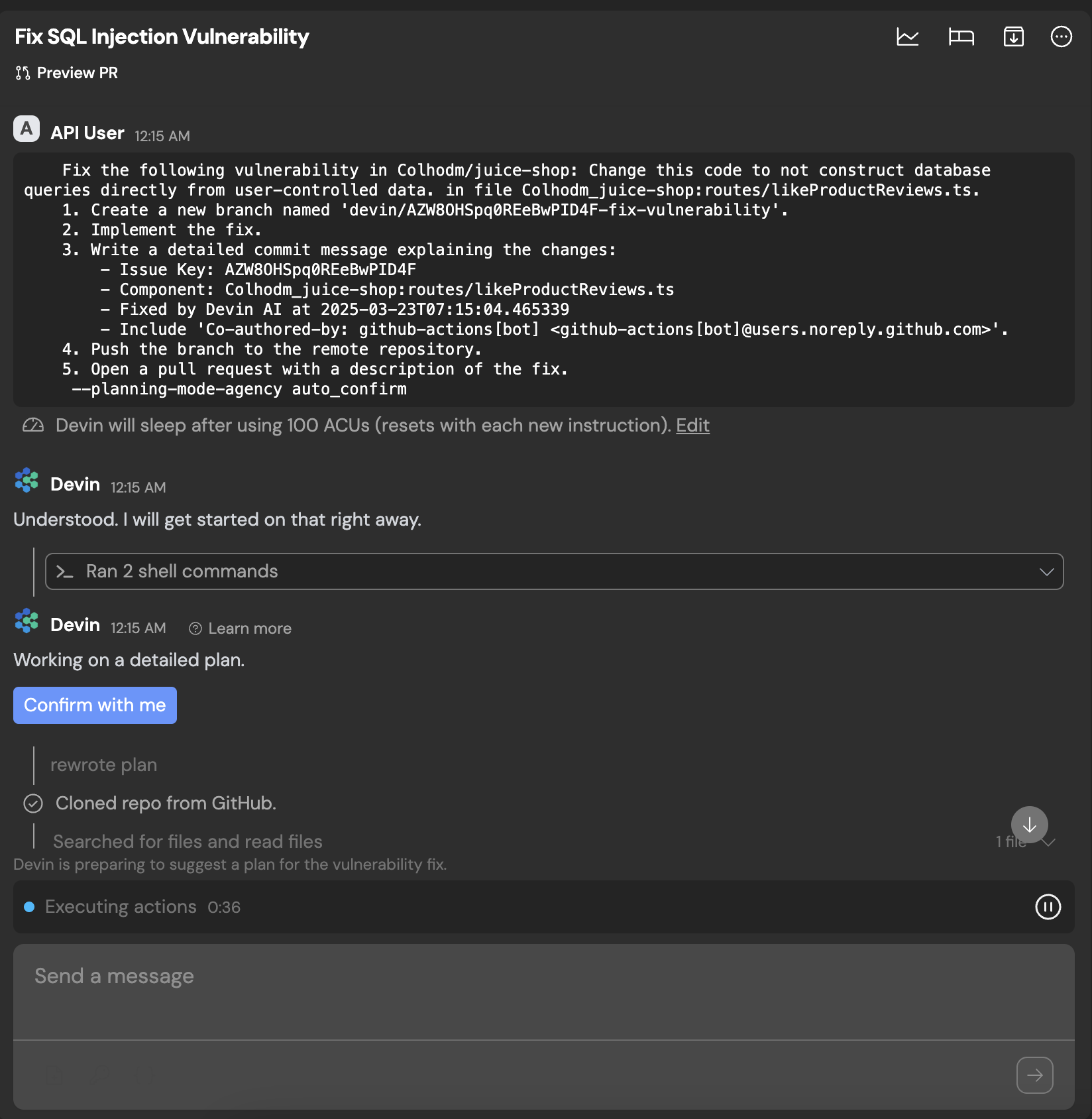 完了すると、Devin は自動的にプルリクエストを作成します。GitLab を利用する場合は、リンク先の[ガイド](/ja/enterprise/use-cases/sonarqube/gitlab)を参照してください。