

Overview
Devin is designed for seamless integration into enterprise environments, with deployment options that balance speed, security, and compliance. Devin can be initiated through the web interface, Slack, or API, ensuring flexibility in how teams engage with the system. Upon activation, Devin operates within a dedicated workspace that includes:- A shell for executing commands.
- A browser for web-based interactions.
- A code editor for reading and writing code.
Devin’s Architecture
Devin’s architecture consists of two key components:- The Brain: A stateless, cloud-based service that powers Devin’s intelligence, always residing in Cognition’s Cloud (similar to GitHub Copilot’s architecture).
- The Devbox: A secure virtual environment where Devin executes code, connects to resources, and interacts with your systems.
Enterprise Cloud Architecture
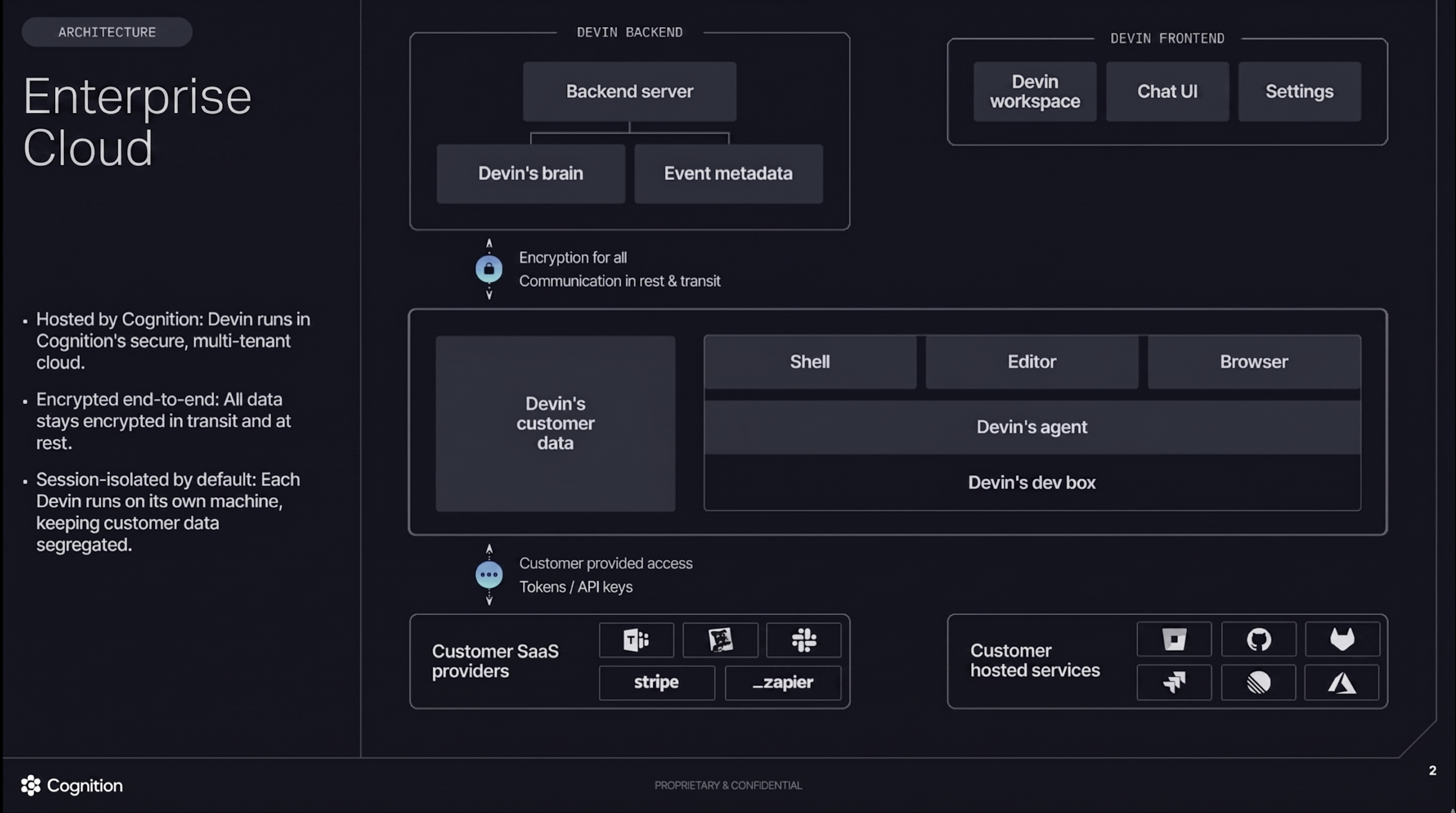
Enterprise Cloud - Hosted by Cognition in multi-tenant cloud
Customer Dedicated Deployment Architecture
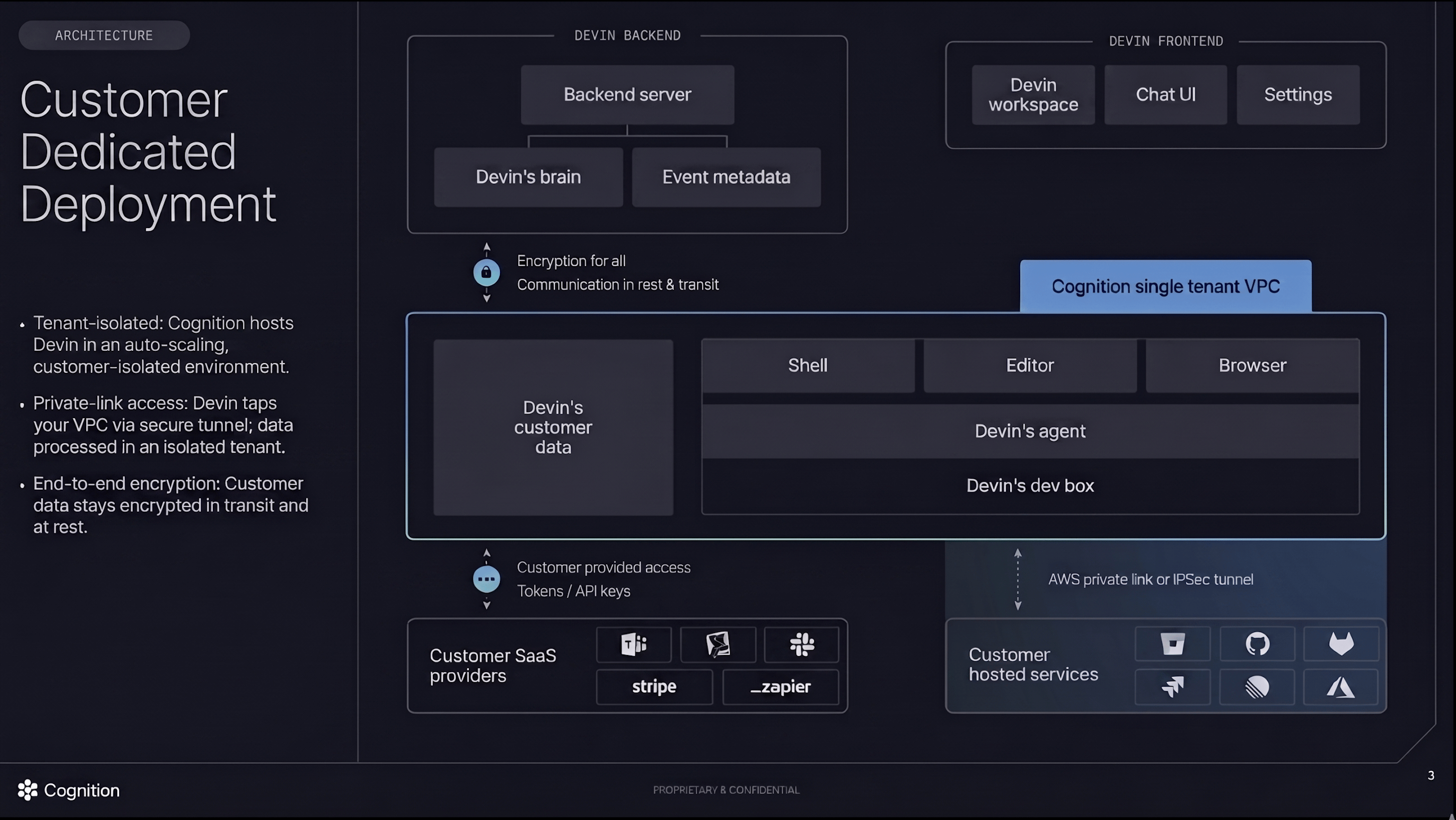
Customer Dedicated Deployment - Tenant-isolated environment with private link access
For detailed steps on configuring AWS PrivateLink connectivity, see Dedicated Deployment Private Networking.
Deployment Options
Devin supports two primary deployment models to meet varying enterprise requirements:Choosing a Deployment Model
Enterprise Cloud Deployment is recommended for most organizations looking for a quick setup with minimal operational overhead. Deployment can be completed within minutes. This model works well when your source code management (GitHub.com, GitLab.com, Azure DevOps Cloud) and artifact stores are publicly accessible or can support IP allowlisting. Customer Dedicated Deployment is ideal for strategic enterprises whose resources are on private networks and cannot support IP allowlisting. In this model, Cognition hosts Devin in an auto-scaling, customer-isolated environment within a single-tenant VPC. Your VPC connects to Cognition’s infrastructure via a secure AWS Private Link (or IPSec tunnel), allowing Devin to access your privately networked resources while maintaining tenant isolation. This deployment model supports MFA VPN access to your internal resources.Important Networking Considerations:
- Devin’s Devbox must be able to reach your source code management systems (GitHub, GitLab, Bitbucket, Azure DevOps), artifact stores (Artifactory, CodeArtifact), and other development tools.
- MFA VPNs are not compatible with Enterprise Cloud deployments. If your resources require MFA VPN access, consider Customer Dedicated Deployment.
- OpenVPN is supported with Customer Dedicated deployments, enabling secure connectivity to your internal resources through your existing VPN infrastructure.
- For self-hosted tools (GitHub Enterprise Server, GitLab self-hosted, Artifactory), you’ll need either IP allowlisting (for Enterprise Cloud) or a dedicated deployment model.
- End user workstations must have connectivity to
*.devinapps.com(HTTPS/443) to access Devin’s interactive session tools such as the IDE and Desktop. If this domain is blocked by a corporate proxy or firewall, users will be unable to use these features. See Customer Dedicated Deployment Requirements for details.
Enterprise Assured Deployment
Includes everything in the Customer Dedicated Deployment and adds Customer Managed Keys (CMK). Please reach out to your Cognition Account Director if you are interested in the Enterprise Assured deployment.
Deployment Specifications
Customer Dedicated Deployment Requirements
For Customer Dedicated deployments, Cognition manages the infrastructure on your behalf. Requirements include:-
Network Connectivity:
- AWS Private Link (preferred)
- IPSec tunnel (alternative option)
- Ability to establish secure tunnel between your VPC and Cognition’s single-tenant VPC
-
Access Configuration:
- DNS resolution for your internal resources
- Network routing configured to allow Devin’s Devbox to reach your SCM, artifact stores, and other development tools
-
End User Workstation Connectivity:
- End user workstations must be able to reach
*.devinapps.comover HTTPS (port 443). This domain serves Devin’s interactive session tools — including the IDE (VSCode frontend) and Desktop (browser viewer) — which are loaded in the user’s browser via iframes. - If your organization uses a corporate proxy or firewall, ensure
*.devinapps.comis on the allowlist for user workstations.
- End user workstations must be able to reach
Cross-Tenant Communication
Devin’s architecture ensures secure communication between your environment and Cognition’s Cloud.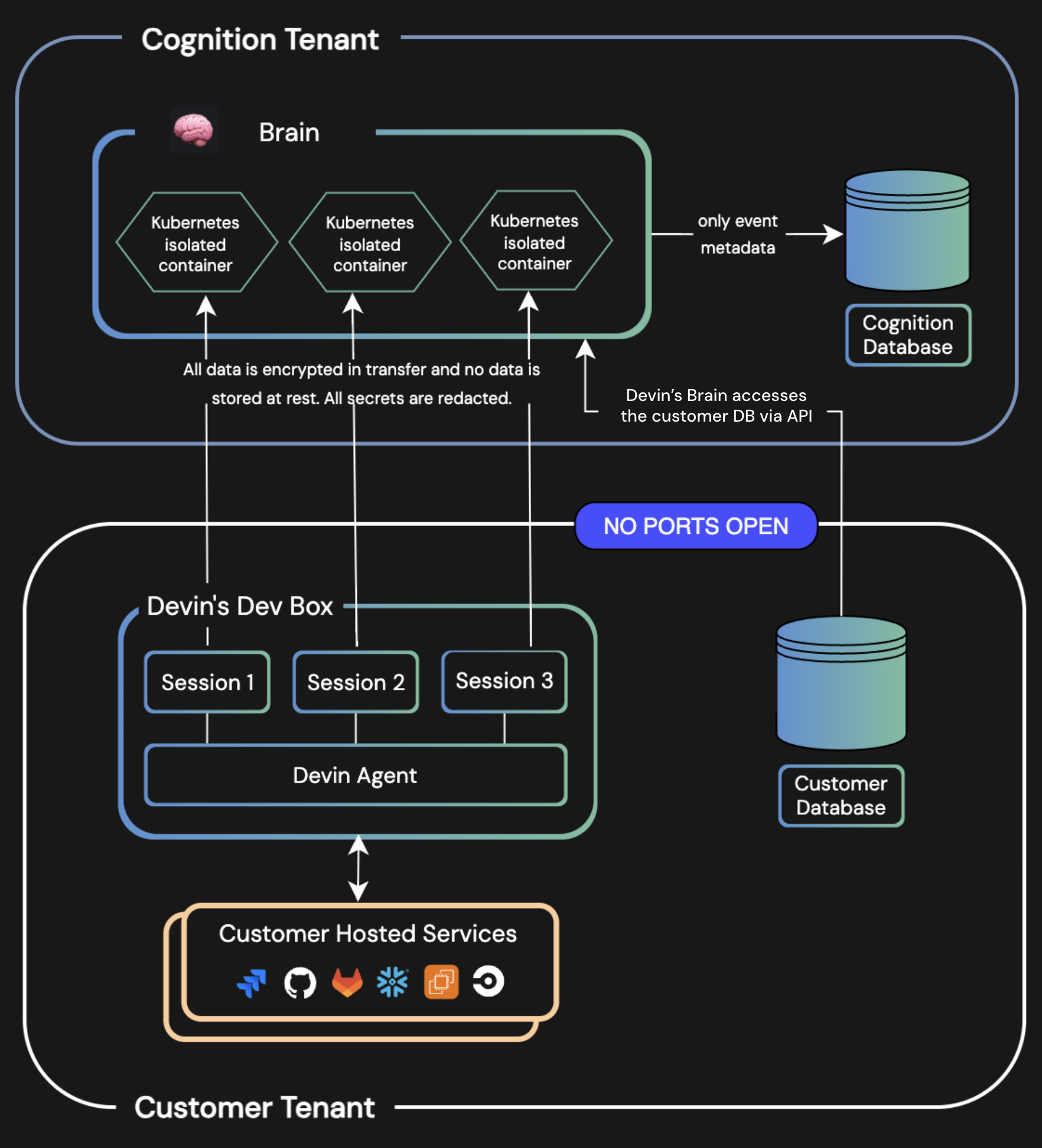
Cognition's Tenant is Hosted on Azure
SSO Guides
Use the following guides to configure single sign-on (SSO) for your enterprise deployment.SSO via Okta
Configure authentication using OpenID Connect with Okta.
SSO via Microsoft Entra ID
Enable seamless authentication with Microsoft Entra ID.
SSO via SAML
Configure authentication using a generic SAML 2.0 identity provider.
SSO via OIDC
Configure authentication using a generic OpenID Connect identity provider.
FAQs & Additional Information
Can we use our own LLM API keys?
Can we use our own LLM API keys?
Devin is a compound AI system and does not currently support third-party LLM API keys.
Do you support GCP?
Do you support GCP?
Please contact our sales team for information on Google Cloud Platform support.
Next Steps
- For Enterprise Cloud Deployment: Start using Devin immediately by logging in to the web app.
- For Customer Dedicated Deployment: Contact our Enterprise Sales Team to discuss your networking requirements and begin the setup process.
- Need Assistance? Contact our Enterprise Sales Team.